4.90 fixed it, but then you reversed it

Posted by Rickard on Mon 28 Jul 2014 09:39 AM — 9 posts, 37,964 views.

#0
I was so happy to find that you actually had a version (if not stable) that resolved my problem I was going to report.

You see, I recently changed encoding of a MUD from ISO-8859-1 to UTF-8, but having trouble finding good MUD clients for Windows. MUSHclient interprets the UTF-8 fine, but it was not able to send Swedish tokens (å, ä, ö, Å, Ä, Ö) to the client. When typed, it showed correctly in the input box, but then sent something completely different.

4.90 solved that problem. Tried it out and was happy.

But then 4.91 reversed that change. Why? I know you were trying to resolve another problem with chinese tokens, but it solved the problem with Swedish tokens.

Can you please fix this again, since a Swedish MUD is completely unplayable without åäöÅÄÖ?

It does, however have one problem. If I save the last command in the inputbox, it replaces it with another token.

So if I type ö (for east), it sends the 'ö' correctly to the MUD, and shows it correctly in the output box, but now shows another character in the input box (ö). If I press enter, it won't send 'ö' again, but the weird on instead. Pressing enter again will replace it with 'ö' instead, and holding down enter causing it to grow, becoming a long text with weird characters.

But even so, I rather have that functionality than not being able to send åäöÅÄÖ at all.
Australia Forum Administrator #1
Check out version 4.94.

http://www.gammon.com.au/forum/?id=12532

The release notes for 4.93 say:

Release notes said:

Extra code to handle inadvertent injection of non-UTF-8 data into a UTF-8 stream (when the output window is set to UTF-8). If a non-valid UTF-8 sequence is found it is assumed to be ANSI data in the current code page, converted into UTF-8 and that is used instead.


As for the input box, it just seemed to do weird things with UTF-8 enabled (I can't remember exactly what now).


Rickard said:

So if I type ö (for east), it sends the 'ö' correctly to the MUD, and shows it correctly in the output box, but now shows another character in the input box (ö). If I press enter, it won't send 'ö' again, but the weird on instead. Pressing enter again will replace it with 'ö' instead, and holding down enter causing it to grow, becoming a long text with weird characters.


Probably something like that gave me a scare. The trouble is, it wasn't designed as a Unicode app, and that is very very hard to retrofit.

However I'm curious as to how other people are managing. For example, I understand some Chinese users are using MUSHclient without any problems.

Are you saying that 4.90 correctly sends the UTF-8 characters to the MUD? I can't make it do that.

You may find that version 4.94 will work for you. If you use the Swedish code page for input then the characters will not be UTF-8 but simply single byte with the appropriate character (however with the high-order bit set). Then when echoed back to the PC it converts it to UTF-8 and it should display properly.
Australia Forum Administrator #2
Bearing in mind I don't have a Swedish keyboard, a test of 4.94 seems to show this works OK.

With the output window set to to UTF-8, and inputting a character such as å, this is echoed OK in the command window, and then sent to the MUD (however not as UTF-8). When received back, though, it is converted to UTF-8 and displayed properly.

The only problem being that if you have input echo on, it is not echoed properly. This plugin works around that by catching your input, and then displaying it converted to UTF-8.

To save a double-display of your input, turn echoing of the input off in the Input -> Commands configuration tab.

Template:saveplugin=Unicode_test
To save and install the Unicode_test plugin do this:
  1. Copy the code below (in the code box) to the Clipboard
  2. Open a text editor (such as Notepad) and paste the plugin code into it
  3. Save to disk on your PC, preferably in your plugins directory, as Unicode_test.xml
    • The "plugins" directory is usually under the "worlds" directory inside where you installed MUSHclient.
  4. Go to the MUSHclient File menu -> Plugins
  5. Click "Add"
  6. Choose the file Unicode_test.xml (which you just saved in step 3) as a plugin
  7. Click "Close"
  8. Save your world file, so that the plugin loads next time you open it.


<?xml version="1.0" encoding="iso-8859-1"?>
<!DOCTYPE muclient>

<muclient>
<plugin
   name="Unicode_test"
   author="Nick Gammon"
   id="1db63b25a1190f46dbdcc949"
   language="Lua"
   purpose="Testing Unicode input"
   date_written="2014-07-29 05:02:48"
   requires="4.93"
   version="1.0"
   >

</plugin>

<!--  Script  -->

<script>
<![CDATA[
function OnPluginCommand (sText)
  ColourNote ("yellow", "", utils.utf8convert (sText))
  return true
end -- function

]]>
</script>
</muclient>


You can change the echo colour from yellow to anything of your choice.
Amended on Mon 28 Jul 2014 08:53 PM by Nick Gammon
#3
Hi,

thanks for your answer!

I did try the 4.94, but it was the same behaviour as the last stable build, why I titled my post that way, but forgot to mention.

After doing the input, it just says "Previous line had a bad UTF-8 sequence at column 4, and was not evaluated for trigger matches." The token shown in the echo is "�" instead of "ö".

So basicly, 4.90 is the only version that works for me, although the input changes, which is quite annoying for reapting commands.

But to answer your question: yes, 4.90 correctly sends the UTF-8 character of the Swedish characters (all of them), and echoes them correct as well. (But then it switches the input, so I can type 'n' for north and hold the enter button to move further, but can't do that for 'ö', as it will change the character to something else.)
Australia Forum Administrator #4
Rickard said:

After doing the input, it just says "Previous line had a bad UTF-8 sequence at column 4, and was not evaluated for trigger matches." The token shown in the echo is "�" instead of "ö".


That shouldn't happen with 4.94, because it converts invalid characters to valid UTF-8. Are you sure you got that message with 4.94?

I still think you should be able to send the non-standard characters using 4.94 and then recall them.

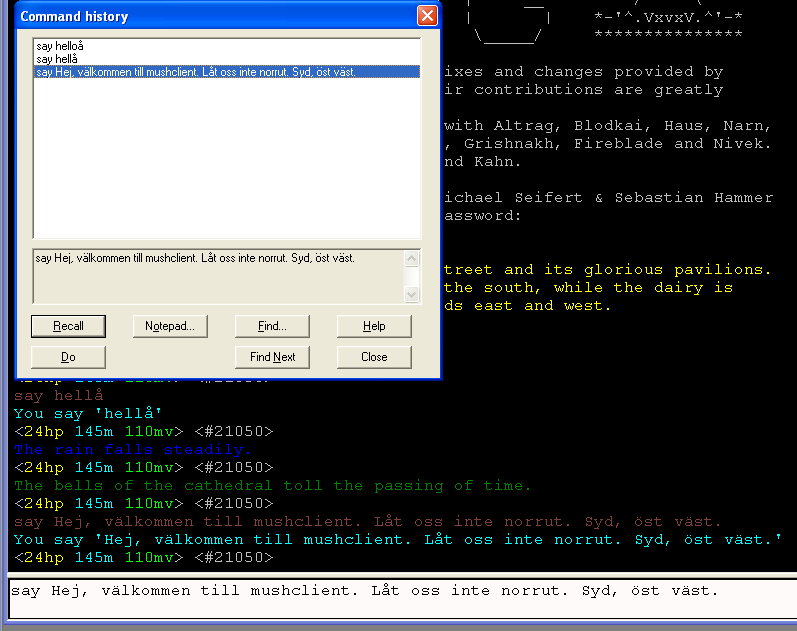
I did a test using 4.94, and it seems to work OK for me:

#5
Strange...I am using 4.94, here's a screenshot of it:

http://i.imgur.com/qS3dCiC.jpg

Though, the character is now correctly "saved" in the input box.

So basicaly, 4.90 and 4.94 "combined" would work.
Australia Forum Administrator #6
Did you install the plugin mentioned above? I would turn echoing of commands off, and let the plugin echo them for you.
Australia Forum Administrator #7
Also try "saying" something with the special characters in it (like I did) to confirm they are making it to the MUD and back.
Australia Forum Administrator #8
You got the message "Previous line had a bad UTF-8 sequence at column 3, and was not evaluated for trigger matches" because you have input and output on the same line. So first you are still echoing your own input, and second you have it set to "Keep commands on the prompt line".

Thus what appears to be bad UTF-8 on the input line is being considered for trigger matching.

Turning off command echoing should stop that.